

- A Carescale admin at the facility creates the endpoint and sends its details to the web developer.
- The web developer connects each form on the website.
How it works
- Someone fills in a form on your website.
- The website sends the submission to your facility’s Carescale endpoint.
- Carescale reads the answers and fills a lead from them: name, phone, email, insurance, who the inquiry is for, the message and more.
- If the phone or email matches exactly one open lead, the submission is added to that lead and fills only fields that are still empty.
- Otherwise it creates a new lead.
- Staff who work leads get a notification such as “New website inquiry from Contact us”. It names the form, never the person.
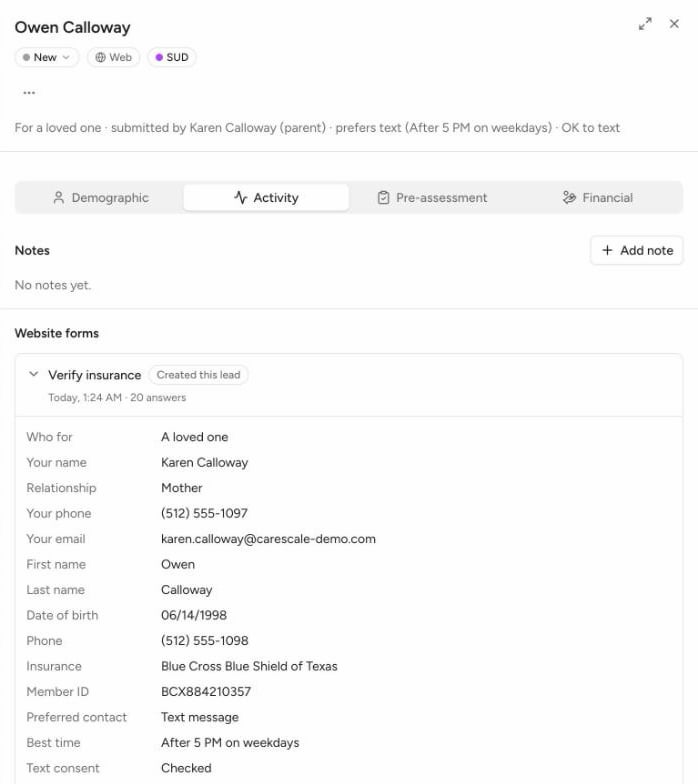
A website inquiry on its lead (sample data)
Step 1: Create the endpoint (Carescale admin)
1
Open Settings
In Carescale, go to Settings, then Website forms, under Operations. Owners, clinical directors, CDOs and admins can open it.
2
Create the endpoint
Choose Create endpoint. Carescale shows your Endpoint address on the card and opens Copy your secret.
3
Copy the secret now
Copy the secret and keep it somewhere safe until you send it. Carescale shows it only once. If it’s lost or leaked, use Rotate secret to make a new one. The old secret keeps working for 24 hours, so the website has time to switch.
4
Send the details to your web developer
Send the Endpoint address and the secret separately, through a password manager or another secure channel, never together in one email. Use Open setup guide on the card to send them this guide.
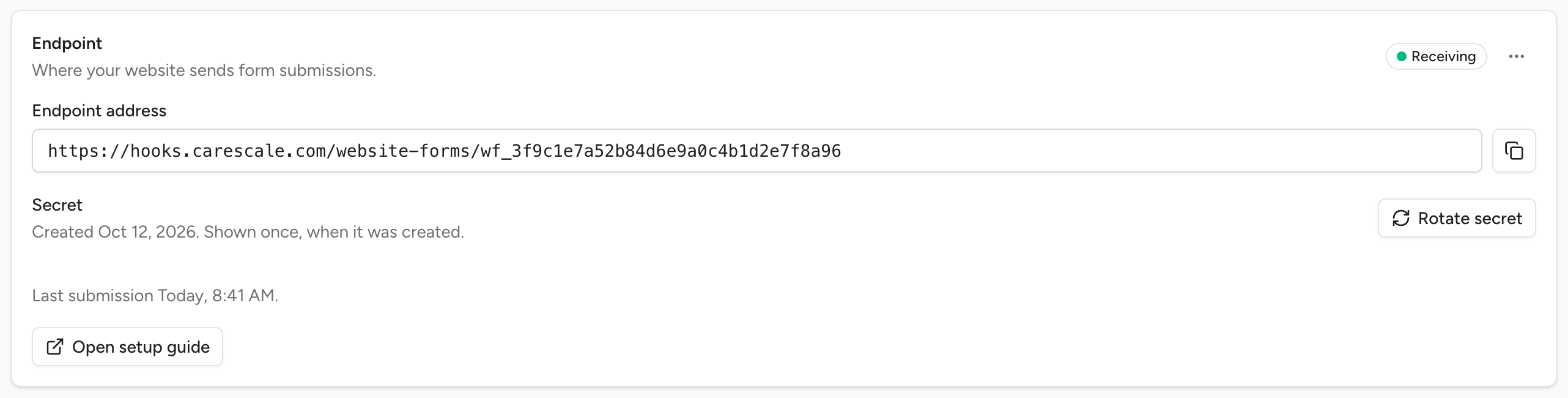
The website forms endpoint card in Settings (sample data)
Step 2: Connect the forms (web developer)
Pick the guide that matches the website:Gravity Forms Webhooks Add-On
Elite or Nonprofit license. No code.
Gravity Forms snippet
Any Gravity Forms license. A short PHP file that also sends each field’s label.
Other form tools
Any tool that can send a webhook with a custom header.
Privacy checklist
Settings the website needs before real inquiries arrive.
Step 3: Check the first submission
Send one test submission with made-up details, then look at the card in Carescale:
Each form appears in the forms list under the card after its first submission. Clear the test lead from the lead’s ⋯ menu with Not an inquiry.
After setup
- Check the field links. Carescale links the keys the Webhooks guide lists as soon as a form’s first submission arrives, and matches every other question to a lead field by its label. A question it isn’t sure about reads Review on the form’s Field links. An admin picks the right field, and can apply the fix to recent submissions.
- Set a source and an owner. Each form can have its own marketing source, so “Verify insurance” and “Contact us” report separately, and a default owner for its new leads.
- Clear junk. Spam, job seekers and vendor pitches are cleared from the lead with Not an inquiry, which can be undone.